
Pivotlar allows you to configure PHP-FPM settings for each individual WordPress site directly from the web interface. This gives you granular control over how PHP handles requests, helping you tune performance based on your site’s resource needs and traffic profile.
These settings are managed under the Site Details > PHP Configurations tab.
Available PHP-FPM Settings #
These options control how PHP worker processes are spawned, managed, and reused for the selected site.
| Setting | Directive | Default Value | Unit | Description |
|---|---|---|---|---|
| Process Manager Mode | pm | ondemand | – | Defines how PHP-FPM manages child processes. |
| Max Children | pm.max_children | 5 | Workers | Max number of concurrent PHP processes for the site. |
| Idle Timeout | pm.process_idle_timeout | 10 | Seconds | How long an idle process waits before being killed. |
| Max Requests | pm.max_requests | 500 | Requests | Max number of requests per child before it’s recycled. |
How to Configure PHP-FPM Settings #
- Go to your Site Dashboard in Pivotlar.
- Select the site you want to configure.
- Open the PHP Configurations tab.
- You’ll see the editable options:
Process Manager: Select between supported values (Pivotlar currently uses ondemand mode by default).Max Children: Set how many simultaneous PHP processes can run.Idle Timeout: Set how long to keep idle PHP processes alive.Max Requests: Automatically recycles PHP workers after this number of requests to avoid memory leaks.
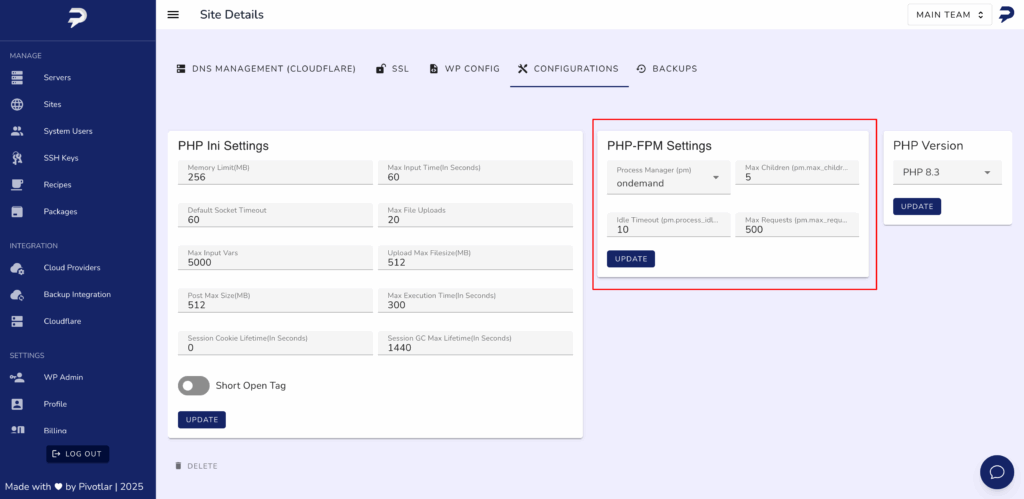
- After updating values, click Update.
- Pivotlar will apply your new settings and reload the PHP-FPM pool for that site automatically — no server restart required.
What These Settings Mean #
- pm: ondemand
The most efficient option for most websites. PHP processes are only started when needed, reducing memory usage on idle sites. - pm.max_children
Controls how many requests can be handled in parallel. Increase this for high-traffic sites, but monitor memory usage. - pm.process_idle_timeout
Helps reduce memory footprint by killing idle processes after a short period. Keep low for sites with low or bursty traffic. - pm.max_requests
Recycling PHP workers periodically can prevent memory bloat. A value like 500 is generally safe for most production setups.
Best Practices #
- Start with default values unless your site has specific performance requirements.
- Monitor memory usage after increasing
max_children. - For WooCommerce or heavy API-driven sites, increasing
max_requestsormax_childrenmay improve concurrency. - Leave
pmset to ondemand unless you know your workload requires static or dynamic modes (not currently exposed in UI).


